Hello Exemplar Community!
We hope that our new FAQ section has been, and continues to be, a valuable resource since it was introduced a few months back! As part of our on-going commitment to make the Exemplar Community a "go to" place for all things Exemplar Global, we would like to begin highlighting some of the FAQs we receive in Support from time to time.
The first FAQ Highlight Friday topic is your Exemplar Community registered email address.
To login to the Community, you need to use your registered email address. You can manage this in your Community profile, and also select your email preferences
However, there are certain emails that need to get through to you - specifically regarding invoices, payment reminders, certification renewals, and other account-based information - including password resets. We rely on your registered email address to make sure you get these important notifications, so please make sure your address is as up to date as possible.
- Your account information, certifications, training, and invoices are all linked to your registered email address
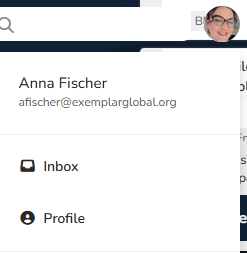
- If you need to update your registered email address, you can easily do so through your profile > click on your photo/initial icon in the top right within the Community, then select "Profile" to update your info:
- Even if you no longer have access to your registered email address, if you remember your password you can still login, then just update your account.
- If you don't remember your password, and can no longer receive emails to your old address, simply Contact us and we would be happy to help!
We hope this information is helpful, and would love to hear your feedback! Feel free to reply to this post with additional questions, or if there are other Support topics you would like to see covered in the future!
------------------------------
Anna Fischer
Customer Success
Exemplar Global/iNARTE
------------------------------